Screen Flicker Made Me Leave Apple After 18 Years
PWM screen flicker gave me dry, stone-heavy eyes for years. I left the MacBook, then Windows, then the iPhone. What I learned about flicker, and what fixed it.
My screens were flickering at me for years, and I never saw it once. I felt it. Dry eyes after forty minutes, a heavy, stone-like feeling behind them, and sleep that got worse the more screen I had in the evening. The cause has a name, PWM flicker, and fixing it took me off a MacBook, then off Windows, and this month off the iPhone I had carried since 2008.
This is a field report from someone whose eyes turned out to be a stricter code reviewer than any engineer I've worked with. And yes, it's also a complaint. Apple charges the most in the market and still ships screens that blink at you slower than phones costing a fraction of the price. If your eyes feel like gravel by mid-afternoon and the optician says everything looks fine, this one is for you.
You can't see PWM flicker, and that's exactly the problem
Most screens dim by switching the light on and off very fast. That's pulse width modulation, or PWM: at 50% brightness the light isn't half as bright, it's fully on half the time and off the other half, hundreds or thousands of times a second. Your brain averages it out. Your eyes, for some of us, do not.
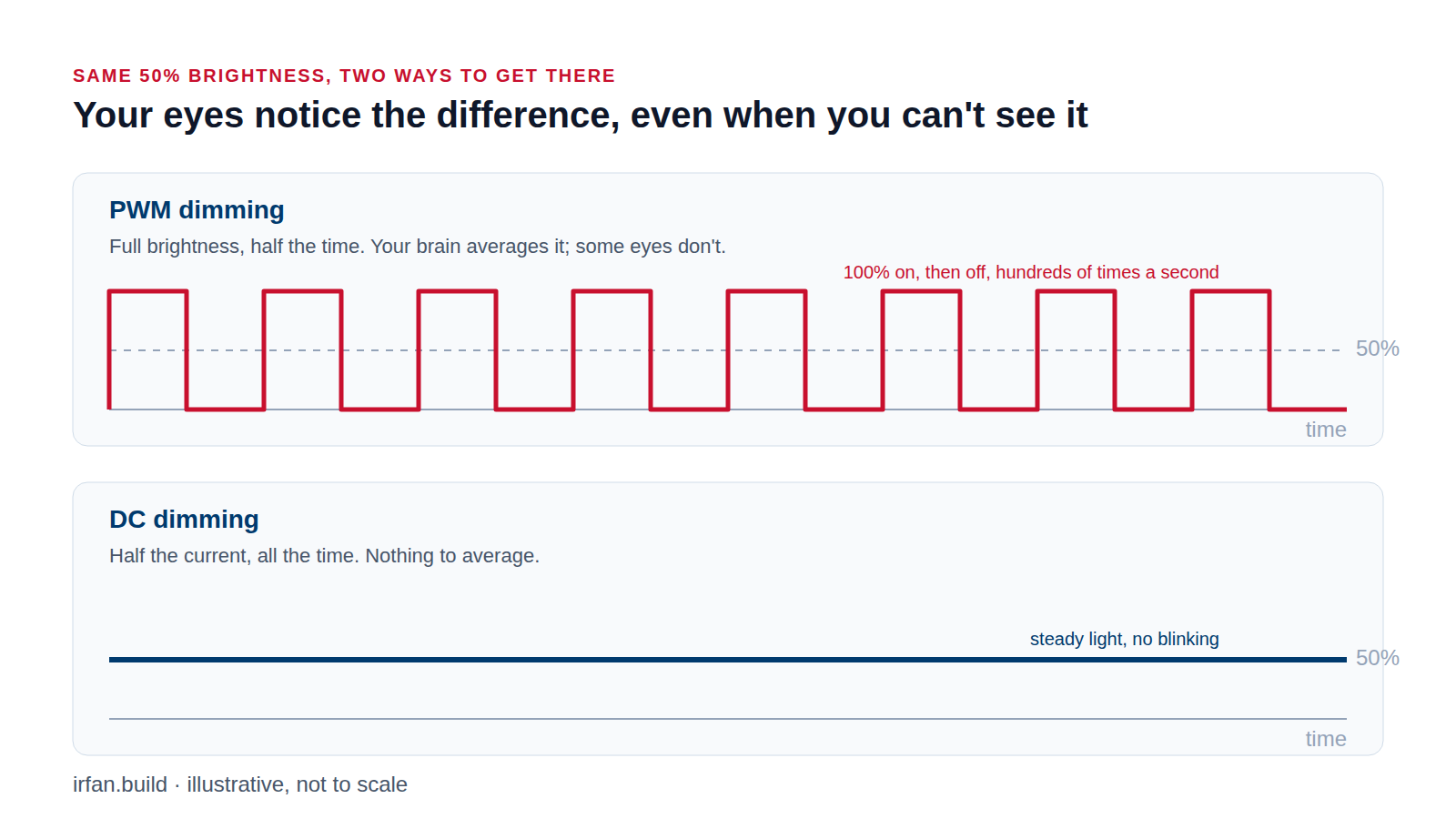
The lower the switching frequency, the worse it tends to be. A screen that pulses at 240 times a second is a very different animal from one that pulses at 15,000. And the dimmer you set the screen, the longer the "off" gaps get, which is why the late-night, low-brightness scroll in bed is the worst possible combination. Cosy for you, a strobe party for your eyes.
There's a second, quieter culprit called FRC, or temporal dithering. Many panels sold as 10-bit are really 8-bit panels that flicker between neighbouring colours to fake the extra shades. Same trick, different flicker. I learned the hard way that I'm sensitive to both, so every screen I buy now gets two questions: how does it dim, and is it a true 8-bit or 10-bit panel?
Nobody knows how many of us there are, and the estimates are not small
The figure you'll see most often is about one in ten people bothered by screen flicker. Here's the honest version: nobody has pinned it down with a solid study, so treat it as a floor, not a fact.
What is better grounded is the direction of travel. Lighting researchers led by Arnold Wilkins reported that headaches roughly doubled under 100 Hz flicker compared with steady light, even though people couldn't see the flicker at all (summary here). Invisible doesn't mean harmless.
And then there's the crowd evidence. Apple's own community forum has a thread called "Eye strain from LED backlighting in MacBook Pro" that started in 2008 and now runs past 160 pages. That's not a bug report; that's a support group.
If that estimate is even close, that's one in ten people at a desk with a headache they can't explain, blaming caffeine, posture or "just getting older." I blamed all three.
You're not the only one squinting
For years I thought this was just me. Then I found two places that made it make sense.
The first is Nick Sutrich, the one YouTuber who covers PWM like it actually matters. His video is the best ten-minute explainer I've found, and it's personal, not a spec sheet. He's also the reason I'm on my current phone: when I couldn't find the OnePlus 15R in Malaysian shops anymore, Nick confirmed the Honor 600 Pro has a true 10-bit panel, and that sealed it.
The second is r/PWM_Sensitive on Reddit: thousands of people comparing phones, laptops, monitors and even light bulbs, with measurements, not vibes. They taught me that frequency isn't the whole story: how deep each blink goes matters too, and so does FRC. If you only read one thread, read their pinned explainer on PWM versus DC dimming.
Apple has started to admit it, barely
In September 2025 Apple quietly added a setting to the iPhone 17 called Display Pulse Smoothing, under Accessibility, that turns off PWM dimming. For people like me this was the screen equivalent of a company admitting the office coffee was decaf all along.
The catch: Notebookcheck's measurements found it only smooths things up to about 25% brightness, and above that the old PWM carries on. It's also mutually exclusive with Reduce White Point, the setting many of us had been using as a workaround. So you get to choose between flicker relief and dimming relief. Pick your poison, gently.
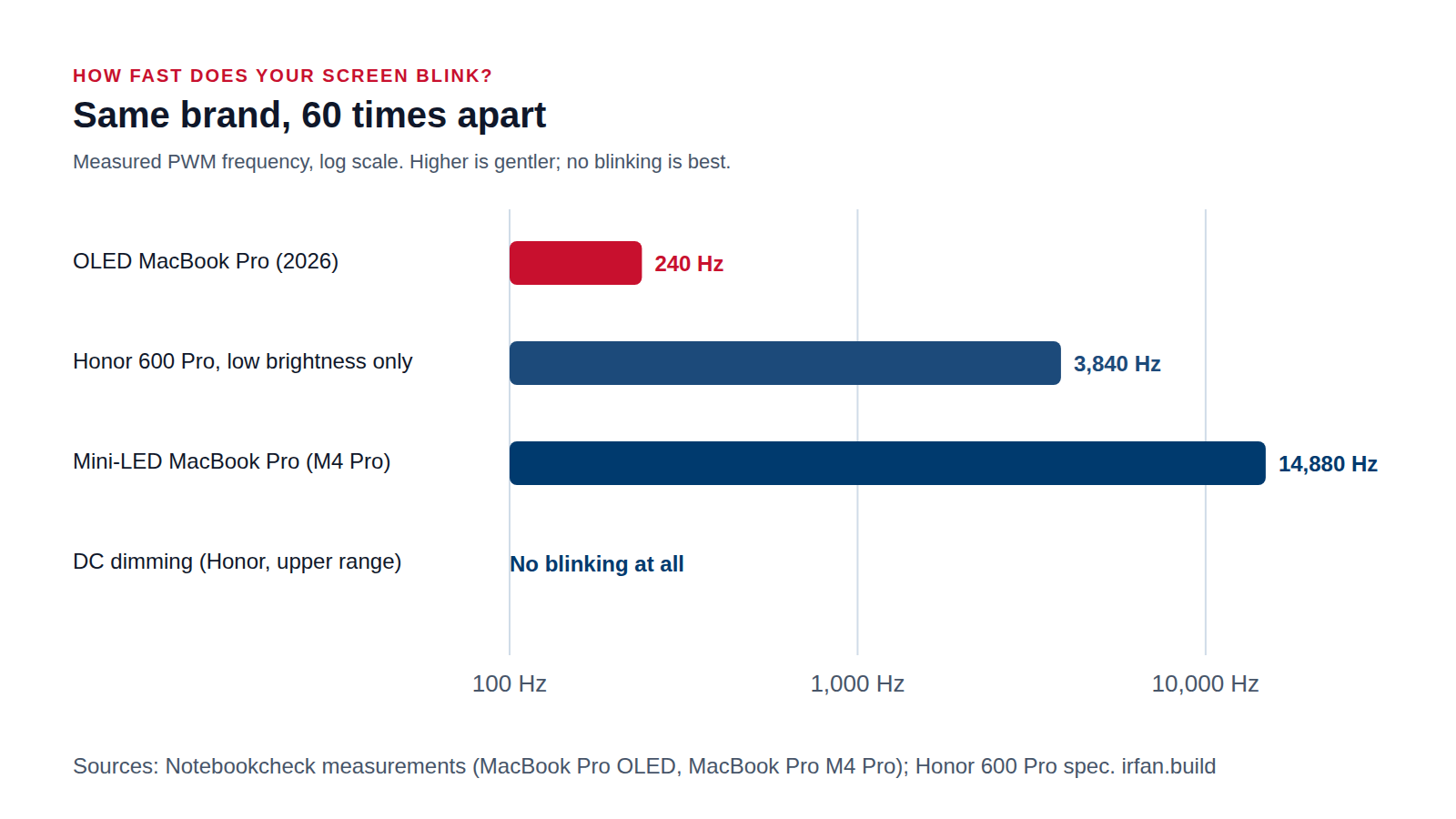
Then this month, owners of Apple's new OLED MacBook Pro started reporting eye strain, headaches and dizziness. Notebookcheck measured its PWM at 240 Hz across most of the brightness range. For comparison, they measured the mini-LED MacBook Pro at around 14,880 Hz. Same company, same laptop line, a 60x difference in how fast the light blinks at you. If you're flicker-sensitive and shopping for a MacBook this Christmas, that difference is the whole story.
Let that sink in. The OLED MacBook Pro starts at $2,899, and it blinks at you slower than the Honor 600 Pro I paid RM 3,399 for, less than a third of the price. Apple's forum has hosted complaints about MacBook eye strain since 2008. The iPhone got a half-fix in 2025. The Mac still has no setting at all, and Apple hasn't said a word about this month's reports. Eighteen years, premium prices every one of them, and the answer for people like me is still "turn it down and hope." When you pay for the best screen money can buy, "it gives some people headaches" shouldn't be a known issue. It should be a recall-level embarrassment.
Step one: the MacBook went, and I didn't see the light coming
About a year ago I moved off my 16-inch MacBook Pro. It was the hardest call because, as an engineer, macOS is home: the terminal, the tools, the muscle memory. But the afternoons had turned into a slow fade of dry, heavy eyes, and when I sat at other screens the feeling wasn't there.
I moved to a ThinkPad X1 Carbon Gen 13 with the plain 14-inch IPS panel. Not the OLED option: Notebookcheck lists PWM as a drawback on that one, and by then I'd learned that the fanciest screen on the spec sheet is often the one that blinks. It ran Windows. My eyes were happier within days. My terminal was not.
Step two: Windows was easy on the eyes and hard on the tools
Windows solved the flicker and created a different kind of strain. I run a lot of AI agents, containers and command-line tooling, and everything I touched on Windows needed a translation layer, a workaround or a second terminal. It was a window of opportunity I didn't want to keep climbing through.
So the X1 went to Linux. It now runs Ubuntu 26.04 and it's my daily driver, called catalyst. Next to it is an old MacBook Pro I rebuilt as an always-on Ubuntu server, called workshop, with the lid closed so its screen never gets the chance to flicker at me. The two machines sync over Tailscale, and my agents run around the clock on workshop. The irony isn't lost on me: the Mac finally works perfectly for me now that I never have to look at it.
Linux, but make it pretty
Here's the part nobody warns you about: leaving macOS means leaving a desktop that looks good out of the box. Stock Ubuntu is honest and capable, and about as stylish as a spreadsheet.
So I built my own and open-sourced it: gnome-omakase. It's my take on Omarchy's keyboard-first, one-theme-everywhere feel, for people who'd rather keep Ubuntu and GNOME. One key switches the terminal, GNOME apps, folder colours, wallpaper and tiling together, across twelve themes. Every change can be undone, and --dry-run shows you each one first.
The theme I live in is called Paper: warm paper, ink-black text, nothing fighting for your attention. It started with my Kindle, the one screen that never hurt. For someone whose eyes complain about light, a calm desktop isn't decoration, it's ergonomics.
Honestly, I haven't missed macOS. I've missed the trackpad. I'll be honest about that one. If you try gnome-omakase, a star on GitHub tells me someone else is squinting less.
Step three: goodbye iPhone, after 18 years
The phone was the last holdout, and the most emotional. I'd been on iPhone since 2008. It's not just a phone at that point, it's identity, family group chats, and a little bit of status if we're honest. But the pattern was the same: 30 to 40 minutes in, dry eyes, and worse sleep, even with the white point reduced, the refresh rate dropped and animations off. I already see an eye specialist and use dry-eye drops. The phone was undoing their work every evening.
In November I switched to an Honor 600 Pro, chosen for one reason: how it dims. It uses DC dimming in the upper brightness range, which lowers the current instead of blinking the light, and switches to very fast 3,840 Hz PWM only at low brightness, with a true 10-bit panel. The stone-eyes feeling went away.
Then I did what everyone does. I went back. One afternoon on the iPhone to sort some things out, and within minutes the stone eyes were back, with the heavy feeling afterwards. That settled it. The Honor stays, the iPhone gets sold, and my rule for the inevitable FOMO is simple: if the eyes are fine, the decision is fine. My eyes made the call; my ego just signed it.
What actually works if you think you're flicker-sensitive
Start by testing yourself, not your screen. Keep a short note for two weeks: how many minutes before your eyes go heavy, which device you were on, and how you slept. The pattern shows up faster than you'd think. Mine was in plain sight; I just wasn't writing it down.
Then:
- Check the dimming, not the marketing. Search the exact model on Notebookcheck and look for the measured PWM frequency. Higher is better; DC dimming or "flicker-free" with a measurement behind it is best.
- Check the bit depth. "10-bit" on a box can mean 8-bit plus FRC. Look for a "native" or "true" bit depth in the spec sheet. Sites like DisplaySpecifications list it.
- Keep brightness high, the room bright. On many PWM screens the flicker gets worse as you dim. A brighter room lets you run the screen brighter without glare.
- Go bigger on text. On my new phone, small text made my eyes work harder and muddied the test. Bigger text helped more than I expected.
- Talk to an eye specialist. Dry eye is real and treatable, and flicker is only one of the things that makes it worse.
- Don't let status make the call. The most expensive device in the shop can be the one with the slowest flicker. This month's MacBook news proves it.
The engineering lesson I didn't expect
I've spent my career telling teams to measure before they argue. "You can't manage what you don't measure" is basically tattooed on my retros. And for years I didn't apply it to the one tool I use more than any other: the screen in front of my face.
The fix wasn't a willpower thing or a wellness hack. It was the same thing that fixes most engineering problems: name the cause, measure it, change the system, check the result. It took three platform migrations to get there. If you're squinting at this on a dim screen right now, maybe turn the brightness up. Your eyes might be trying to tell you something, in pulses.
Eighteen years of Apple, undone by a light dimming 240 times a second.
If you're an engineering leader rethinking how your team works, not just what it works on, let's talk. I promise the call is flicker-free.
Thanks for reading.
Notes on AI-native products, platforms and operating models, from twenty years of building technology that pays its way. If this one landed, let's talk.
More writing
All writing →
My team merges about 145 PRs a week with AI agents: 20-minute median to merge, 2 rollbacks in 623. Here is the policy and review gate that make it work.
Read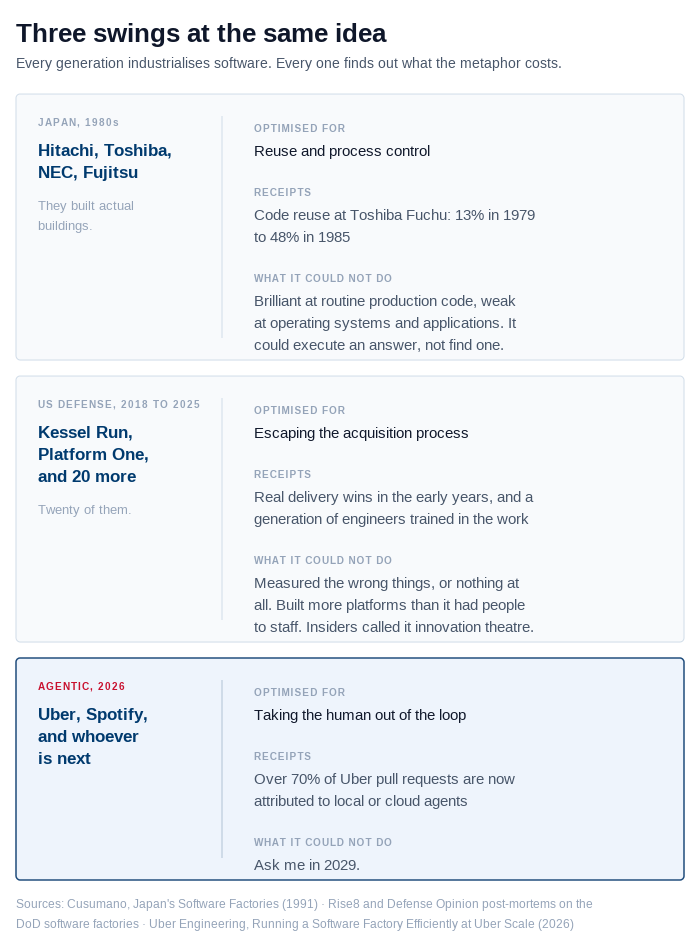
Software factories were tried in 1980s Japan and again across US Defense. Both fell short in the same way. The agentic version in 2026 is different in one specific respect, and it is not the agents.
Read
I asked an AI to summarize a book about how people learn. It took me a second to notice what I had just done, and longer to work out why it bothered me.
Read